


The Call Analytics section provides detailed insight into how your AI agents are performing across inbound and outbound calls. It includes call volume, duration, timelines, outcomes, and conversation records, allowing you to review engagement quality and overall activity at both a summary and individual call level. This section is designed for analysis and optimization—helping you understand what’s happening on calls, identify patterns, and diagnose issues—rather than for making live configuration changes.
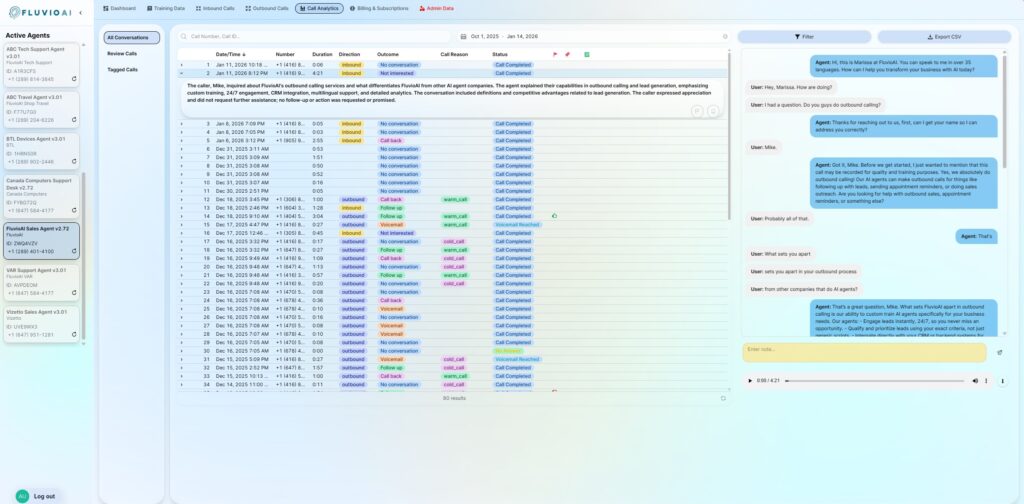
1. All Conversations
A detailed list of all the calls handled by the agent. This list organizes information by: Call Direction, Phone Number, Outcome and other details. It can also be sorted, filtered, and various date ranges can be applied as needed.
When a specific call is selected, the row expands to provide the summary. In addition, the call transcript is shown to the right.
A call can be flagged, or bookmarked. Flag all calls that are bad or incorrect. This will help us to refine the agent and improve it’s performance. In addition, it is good practice to flag any great or exceptional calls. This will allow us to reinforce this positive behaviour.
The yellow ‘notes’ field at the bottom allows you to add any specific notes and attach it to the call.
The audio recording can be played, and downloaded using the UI at the bottom of the call transcript.
2. Review Calls
This list displays all the important calls the agent automatically flagged for your review. It is best practice to review these calls regularly to ensure that quality is being maintained.
Click the CHECK box on the call and it will be flagged as ‘reviewed’. It will no longer appear in this list.
3. Flagged Calls
This list displays all the calls you flagged (good and bad) and bookmarked.
This is an easy way to find calls that are important without having to search through the entire call log list.