


Outbound calls, like cold outreach, inviting contacts to an event, or post-event follow-ups are inherently more complex than inbound calls. With inbound calls, the person contacting your agent already has intent. With outbound calls, the agent must navigate voicemail, gatekeepers, and low-context recipients, while quickly explaining the purpose of the call and earning enough interest to continue the conversation.
FluvioAI agents are trained to handle a range of outbound scenarios. This article covers best practices for configuring an outbound calling campaign.
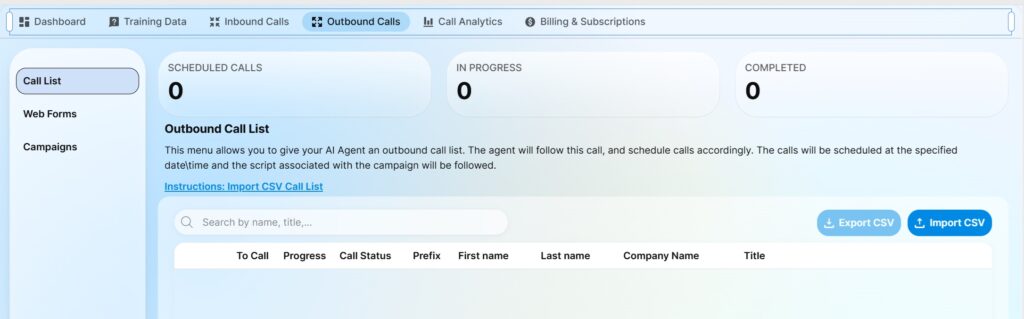
Outbound calls can be managed through the ‘Outbound Calls’ Menu in your agent management console. Here, not only can you upload lists of contacts for the agents to call, but also configure various campaigns.
What is a Campaign?
Every time your FluvioAI agent calls someone, you can select a campaign – or a reason – for the call. This campaign establishing the intent of the call and triggers a set of different scripts that are already uploaded to your agent. The Campaigns button allows you to manage and configure your existing campaigns.

Every campaign can be broken down into a few key items: voicemail to leave, SMS to send when voicemail is reached, opening statement when the caller is on the line, and an end of call thank you message.
Opening Pitch: Once the agent reaches the intended individual, this is the opening line that is used to trigger a conversation. Make it short, punchy and to the point. “Hey, we noticed that you haven’t visited our clinic in a while, we just wanted to find out how you are doing and offer you a 10% coupon. Do you have a few minutes to chat?”, or “Thank you for attending our event last Saturday, just wanted to take a few minutes and get your feedback. Is this a good time?”
Voicemail: This section configures a custom voicemail in the event the caller does not pick up. Use a short and concise statement that clearly states the intent, and provides a call back number, so the caller can reach the agent at their convenience. Remember, your agent works 24/7, 265 days a year. This makes it very easy for the caller to call back at their convenience.
Voicemail SMS: A lot of people don’t pay attention to voicemail that they are not expecting. This allows the agent to leave a SMS message, in addition to leaving a voicemail. This increases the likelihood that the caller will get the message.
Thank you SMS (To Caller): This SMS message is sent to the caller after a successful call. A successful call is a call that did not go to voicemail, and the agent connected with the right individual, and had a conversation. For example, if you are inviting the caller to an event, you can add the address, registration link and related event information to this thank you SMS message.
Thank you SMS (To Company): This SMS message is send to the Company’s representative after a successful call. This allows your team to keep tabs in real-time and make sure that the agent is performing their duties.