


The Outbound Calls section is where you control how and when your AI agents proactively reach out to customers or leads. From here, you can upload or manage call lists, schedule outbound calls, assign campaigns, and define what happens when a call is answered, declined, or goes to voicemail. This area is designed to support structured outreach—such as follow-ups, warm calls, re-engagement, and reminders—while giving you clear visibility into call status, progress, and outcomes. All outbound behavior follows the campaign logic and agent training associated with each call, ensuring consistent messaging and predictable execution at scale.
1. Call List
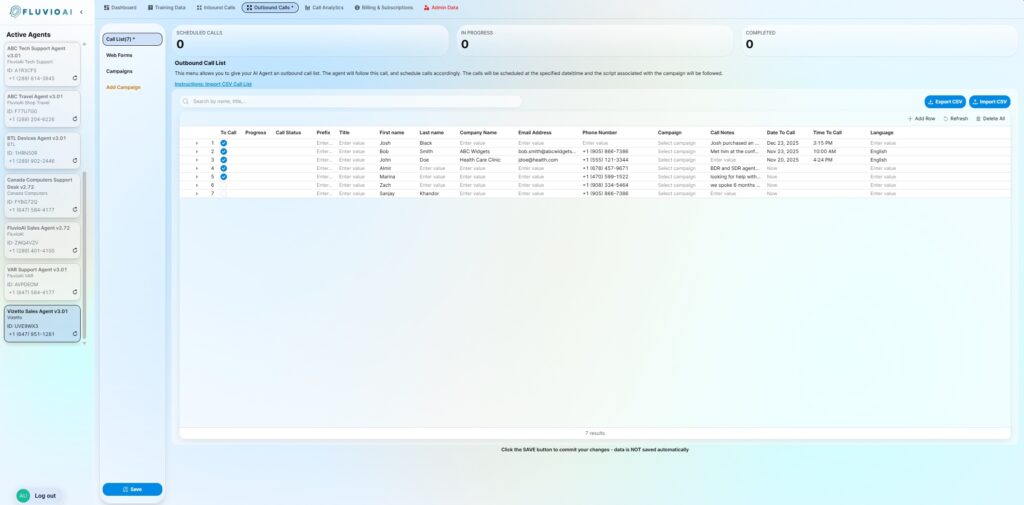
The Call List is where you define who your AI agent should call and when those calls should occur. Each row represents a single outbound call target, including contact details, scheduling information, campaign assignment, and call-specific notes. Once saved, the agent follows this list exactly—placing calls at the specified time, applying the selected campaign logic, and updating call status as each attempt is completed. This section is optimized for controlled, repeatable outreach, whether you’re running small targeted follow-ups or larger outbound call batches.
Adding Customer Information
You have the ability to add individual records manually, by clicking the + button on the bottom status bar, or you can simply import in a CSV file with all the of the information. There is a FAQ on how to structure this CSV in this article.
Configure the Call
There are two important pieces of data the FluvioAI agent relies on in order to process the outbound call. Filling in these details accurately is critical for the agent to make a successful call. Pay attention to these fields:
Campaign: This is the actual reason for the call. Pick the right campaign such that your agent can follow a specific script.
Call Notes: This field gives the FluvioAI agent detailed information about the specific customer. These can be notes from your CRM, or a simple statement. Use this field as a summary, so the agent can quickly refer to something specific. Good examples are: “He showed interest in Product X, 6 months ago and was waiting for budget approval”, “She asked for us to call back in 3 weeks”, “Can to our last event and expressed interest in Y”. Short succent sentences are best for this field.
2. Web Forms
This section allows you to configure a specific type of outbound call – a call triggered by a web form.
The Webform section enables instant AI-driven call-backs when a prospect submits their information on your website. Instead of sending follow-up emails that get ignored or land in spam, your agent places a live call to the prospect, qualifies their interest, answers questions, and can book an appointment or next step in real time. This creates immediate engagement at the moment of highest intent, turning passive form fills into real conversations—without manual follow-up or delays.
Your existing web form can be easily connected to the FluvioAI agent. Here is an article on how to do this.
The webform is just a special campaign that is triggered when a form is completed, as such all of the data is similar to a campaign.
3. Campaigns
Campaigns are at the heart of FluvioAI agent’s ability to craft a compelling conversation that delivers results and ROI! Here are all the details you need to think through to launch a campaign.
You cannot create a campaign, reach out to the FluvioAI team, and we will create the campaign for you. Once this is created, you can easily edit, configure, fine tune and manage the campaign on a daily basis.
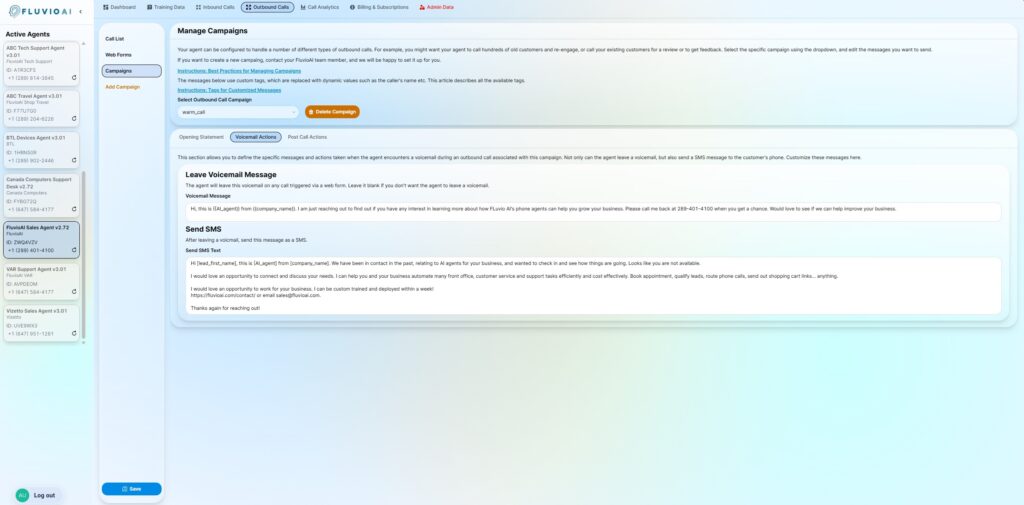
Opening Statement
The first message the agent uses when a call is answered. This statement sets the tone of the conversation and introduces the purpose of the call. The agent can adapt this opening to navigate common gatekeepers (such as receptionists or automated attendants) and attempt to reach the appropriate contact, within reasonable and ethical limits, before engaging in the main conversation.
Once the appropriate individual has been reached, the agent delivers the opening statement.
Context for Call
Background information the agent uses internally to understand why the call is being made. This helps the agent respond naturally and stay aligned with the specific intent of the outreach without repeating this context verbatim to the caller. This helps the agent to create a compelling flow.
Voicemail Message
The message the agent leaves if the call goes to voicemail. This should be concise, clear, and focused on prompting a return call or next action.
Voicemail SMS
An optional follow-up text message sent after a voicemail is left. This reinforces the call intent and provides a quick, low-friction way for the prospect to re-engage.
Post Call Notification (To Caller)
A simple thank you message that will be sent to the caller as an SMS after the completion of a successful call. This is a great place to give the caller additional details, such as the address for an event, a sign up link for a webinar, or other additional information related to this specific campaign.
Post Call Notification (To Company)
This is a summary email\text that is sent to the company to notify the team about the call. You can add transcripts, summaries or other details as you choose.