


The Custom SMS section allows you to setup and configure custom SMS text messages that can be sent out during the call. These messages can be used to send real-time information to the caller, based on the context of the call, or a caller’s question. This allows you to send the caller very specific messages such as: a blog, a link to a video, brochures or webpages or even very specific support articles or links to forms, based on the conversation.
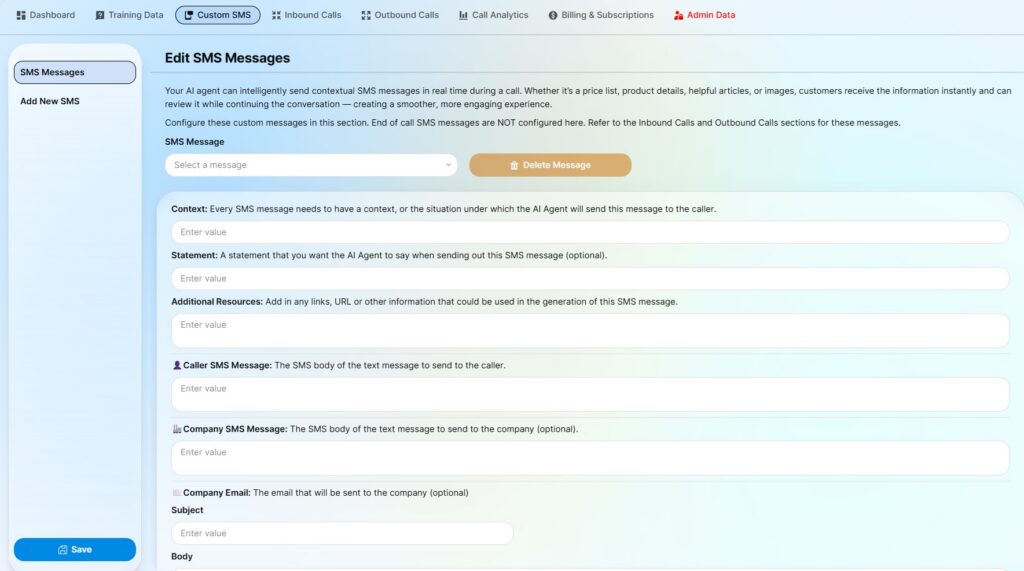
SMS Messages:
You can edit and configure your custom SMS message using this menu. The AI agent uses all of this information to determine when to send this message and what information to send to the caller.
Context: The context of the message helps the AI agent determine under what conditions to use this message. Be as specific, and clear, as possible with the context such that the agent can be accurate.
Statement: Just a simple transition phrase that the AI agent should say before sending the message.
Additional Resources: This will help the agent formulate custom messages based on the details of the conversation. For example, depending on the question that the caller asked, you might want to send different links to a FAQ or support articles. Instead of creating a custom message for every link, you can list the links in this section, and the AI agent will use the conversation, the context, and the additional information to craft a custom real-time message.
Caller SMS Message: This is the actual message that will be sent to the caller. Format it the way it should appear on their phone. Leave any dynamic variables (such as links or information from Additional Resources) as a [tag] in square brackets.
Company SMS Message (optional): You can also trigger a message to your Company, informing someone that this specific message was sent out. This is useful for escalation and real-time tracking purposes. Leave this blank if you do not need to notify anyone.
Company Email (optional): You can also trigger an email to your Company, informing someone that specific message was sent out. Leave this blank if you do not need to notify anyone.
Add New SMS:
This menu allows you to add a new message. Give the message a name that is descriptive (patient_followup, sales_brochure, faq_article etc.) and fill in the details. This will add a new message to the AI agent database.